আপনার panel/MT5 Accounts
এই পেজ এখনো বাংলায় লেখা হয়নি, তাই ইংরেজিটা দেখানো হচ্ছে। English সংস্করণ
MT5 Accounts
Your MetaTrader 5 accounts, their EA keys, and whether each EA is online.
Open MT5 Accounts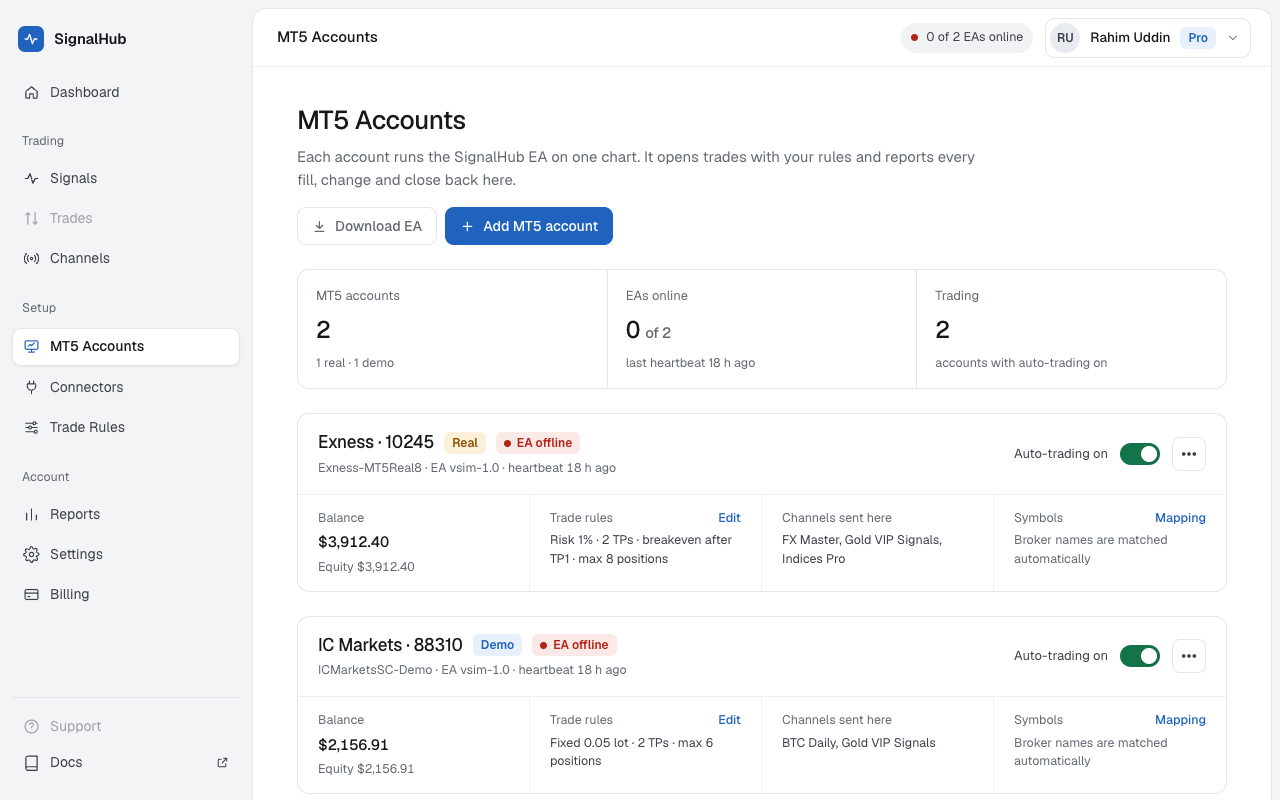
Adding an account
Add account makes a key for the EA. There's no form: broker, number, balance, and real or demo are read from your MT5 when the EA connects. The steps are in MT5 and the EA.
Each account's card
| Item | What it shows |
|---|---|
| Status | EA online, EA offline, or Waiting for the EA for a key that never connected |
| Broker, server, account number, leverage | From your MT5 |
| Real or Demo | Real accounts need the risk notice accepted once before they trade |
| Balance | As the EA last sent it |
| Trading | Auto-trading on or off for this account |
| Channels sent here | Which channels trade on it |
The account's menu
- Rename: a name you'll recognise, like "Exness main".
- Make a new key: the old key stops at once and the EA disconnects. Paste the new key into the EA.
- Remove account: SignalHubFX stops sending it signals and forgets the key. Positions at the broker stay open with their SL and TP.
Limits
Free has 1 account; Pro 4, and more as add-ons. An MT5 account can be linked to one SignalHubFX key at a time.