আপনার panel/Signals
এই পেজ এখনো বাংলায় লেখা হয়নি, তাই ইংরেজিটা দেখানো হচ্ছে। English সংস্করণ
Signals
Every signal from the channels you follow, what each of your accounts did with it, and why.
Open Signals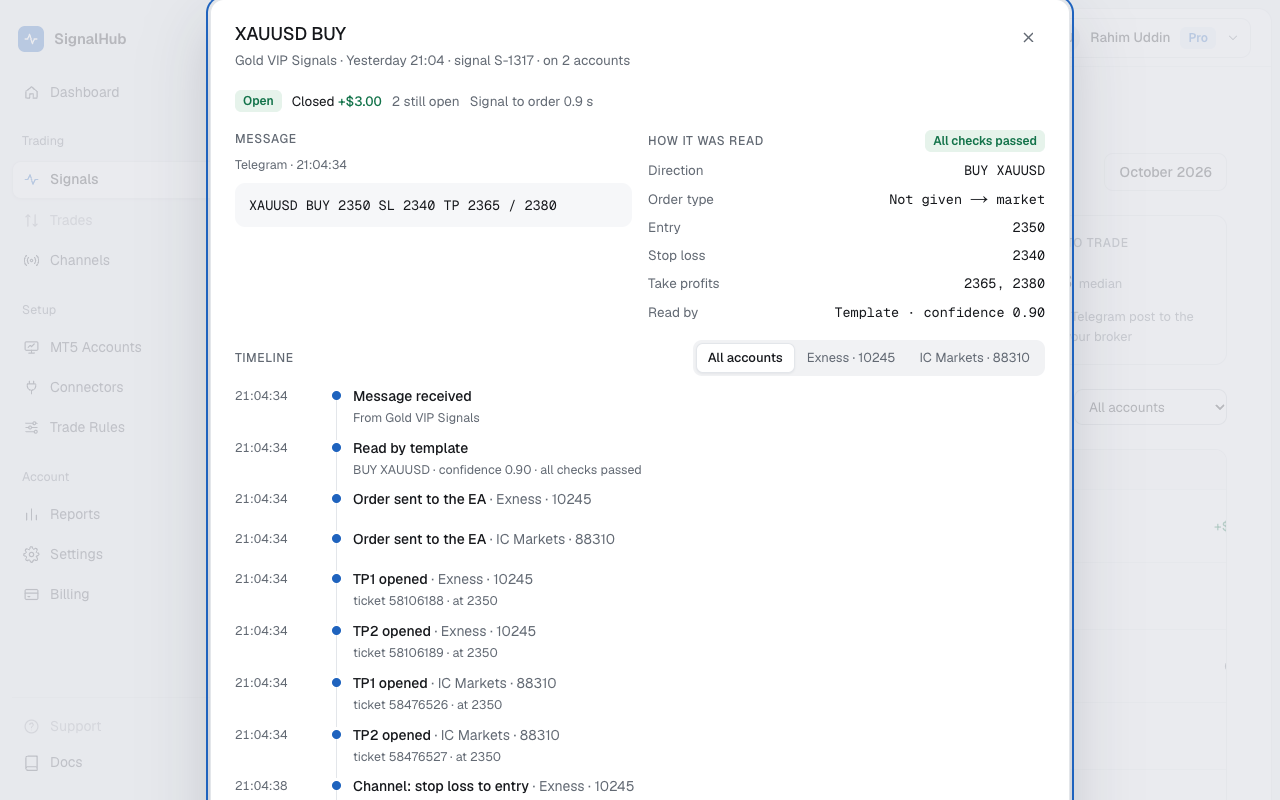
The list
Each row is one signal: symbol and side, the channel, when it came, its status, and the P/L on each account. The filters on top show today's signals, those in progress, open, closed, or Not traded, and you can narrow by channel or account.
A signal shows up as soon as it passes the first filter, before it's read, so you can watch it move.
Statuses
| Queued | A message from your channel is waiting its turn for the AI, usually under a second. |
| Reading | The AI is turning the message into a signal. If it isn't a signal, the row goes away. |
| Checking rules | It's a signal; your trade rules and plan limits are being checked. |
| Sent | An order went to at least one of your EAs. |
| Open | At least one position is open at your broker. |
| Closed | Every position from this signal is closed. |
| Rejected | The signal failed a safety check, or every EA refused the order. |
| Not sent | Your settings or plan kept it from every account. |
Why a signal wasn't traded, and what to do: Signal statuses and reasons.
The timeline
Click a signal to open its timeline:
- Message: the Telegram post as it arrived.
- How it was read: symbol (and your broker's name for it), direction, order type, entry, stop loss, take profits, who read it and how sure it was, and the checks it passed.
- Timeline: every step with its time, for each account: sent to the EA, opened, stop loss moved, take profit hit, closed.
- Positions: each position with its lot, fill price, SL, TP, status and P/L.
Follow-ups show up in the same timeline: "move SL to entry", "close TP1", or an edit of the message.
Something looks wrong?Use Ask support at the bottom of the timeline. We see exactly what you see.