Your panel/Signals
Signals
Every signal from the channels you follow, what each of your accounts did with it, and why.
Open Signals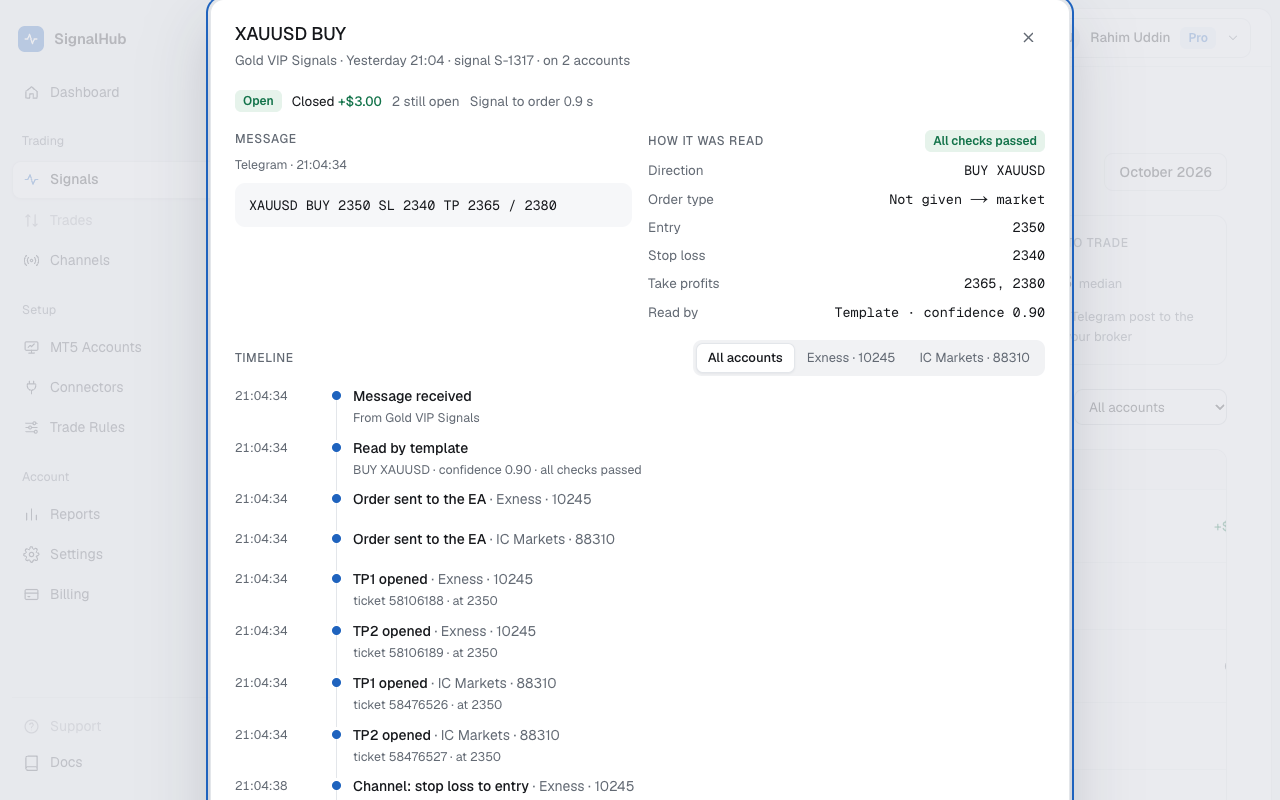
The list
Each row is one signal: symbol and side, the channel, when it came, its status, and the P/L on each account. The filters on top show today's signals, those in progress, open, closed, or Not traded, and you can narrow by channel or account.
A signal shows up as soon as it passes the first filter, before it's read, so you can watch it move.
Statuses
| Queued | A message from your channel is waiting its turn for the AI, usually under a second. |
| Reading | The AI is turning the message into a signal. If it isn't a signal, the row goes away. |
| Checking rules | It's a signal; your trade rules and plan limits are being checked. |
| Sent | An order went to at least one of your EAs. |
| Open | At least one position is open at your broker. |
| Closed | Every position from this signal is closed. |
| Rejected | The signal failed a safety check, or every EA refused the order. |
| Not sent | Your settings or plan kept it from every account. |
Why a signal wasn't traded, and what to do: Signal statuses and reasons.
The timeline
Click a signal to open its timeline:
- Message: the Telegram post as it arrived.
- How it was read: symbol (and your broker's name for it), direction, order type, entry, stop loss, take profits, who read it and how sure it was, and the checks it passed.
- Timeline: every step with its time, for each account: sent to the EA, opened, stop loss moved, take profit hit, closed.
- Positions: each position with its lot, fill price, SL, TP, status and P/L.
Follow-ups show up in the same timeline: "move SL to entry", "close TP1", or an edit of the message.
Something looks wrong?Use Ask support at the bottom of the timeline. We see exactly what you see.