Billing
Your plan, what you use, add-ons, and your payments and receipts.
Open Billing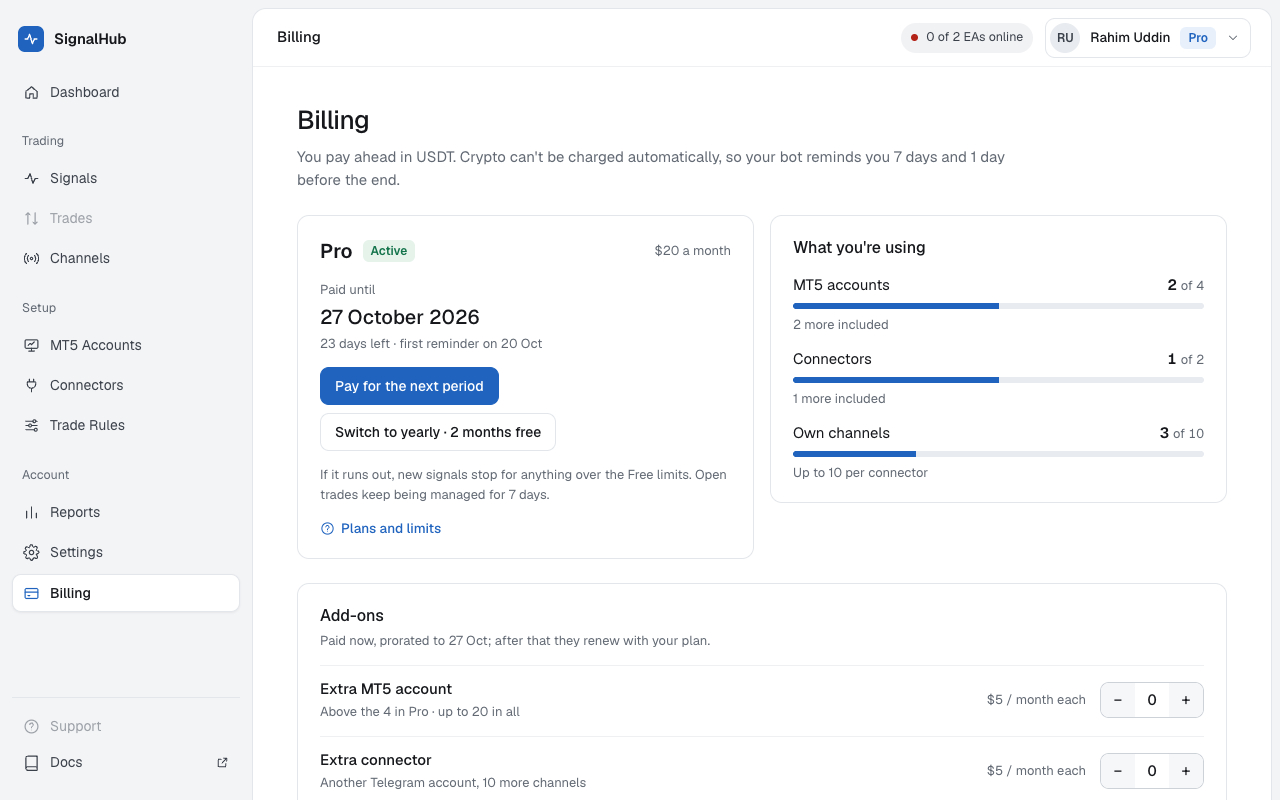
Your plan
Shows Free or Pro, how long Pro is paid for, and what you use against your limits. The limits are in Plans and limits.
Paying
You pay ahead in USDT, monthly ($20) or yearly ($200, two months free). Crypto can't be charged automatically, so your bot reminds you 7 days and 1 day before Pro ends.
Pick the period
Upgrade to Pro (or Pay for the next period) and choose 1 month or 1 year. Renewing starts after your current period ends, so you lose no days.
Coupon and network
Type a coupon if you have one; the price updates before you pay. Choose the network: TRC-20 has the lowest fee.
Pay on the payment page
Continue to payment opens a secure payment page. Send the exact amount on the network you picked. Your plan extends as soon as the network confirms, usually in a few minutes.
If something's off
| What happened | What we do |
|---|---|
| You sent too little | We keep it and show what's left. Pay the rest within 24 hours to the same address, or ask support to keep it as credit. |
| You sent too much | The extra becomes credit for your next payment. |
| You paid after the invoice expired | Matched by hand within a day. |
Credit is used on your next payment on its own.
Add-ons
On Pro, add an extra MT5 account or connector for $5 a month each. You pay now for the days left in your period; after that they renew with your plan. Removing an add-on lowers your limit at once with no refund, so remove the account or connector first.
Payments and receipts
Every invoice with its status. Receipt opens a printable receipt; it's also emailed to you.