Trade Rules
How big each trade is and when the EA skips one. Every MT5 account has its own rules; copy them to other accounts with Copy rules to….
Open Trade Rules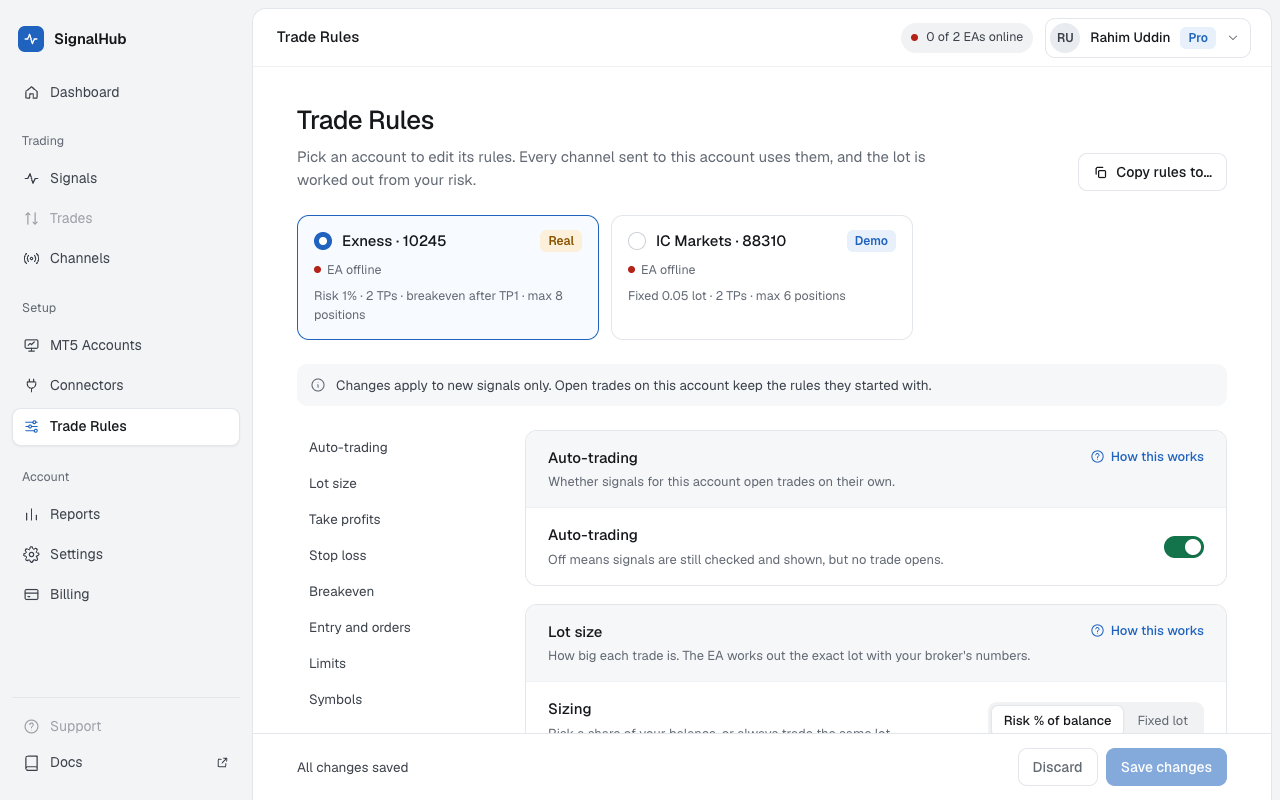
Auto-trading
Whether signals for this account open trades on their own.
| Setting | What it does | Example |
|---|---|---|
| Auto-trading | Off means signals are still checked and shown, but no trade opens. | Turn it off before big news; open trades keep their SL and TP. |
Lot size
How big each trade is. The EA works out the exact lot with your broker's numbers.
| Setting | What it does | Example |
|---|---|---|
| Sizing | Risk a share of your balance, or always trade the same lot. | Risk per signal, or Fixed lot |
| Risk per signal | Spread across all take profits of one signal. At most 10%. | 1% of $5,000: about $50 at risk if every SL is hit |
| Lot per signal | Fixed lot, split across the take profits. | 0.10 with 2 TPs: 0.05 + 0.05 |
Take profits
Each TP becomes its own position with its own take profit at the broker.
| Setting | What it does | Example |
|---|---|---|
| Use at most | Extra TPs in a signal are ignored. | 3: a signal with 5 TPs uses TP1 to TP3 |
| Split of the lot | The share of the lot for each TP. Equal unless you set your own. | 50 / 30 / 20 |
| If price already passed a TP | When the EA gets the signal late and a TP is behind the price. | Skip that TP, or open it anyway |
| If a TP's lot is below the broker minimum | Small accounts can't always split a lot three ways. | Join it with the last TP, or skip it |
Stop loss
Most signals give one. This decides what happens when one doesn't.
| Setting | What it does | Example |
|---|---|---|
| Signal without a stop loss | Never trade without a stop loss at the broker: skip it, set one by distance, or 1:1 to TP1. | Distance |
| Distance from entry, per symbol | In points, by the symbol the signal uses. All others use the last line. | XAUUSD 300 · all others 30 |
Breakeven
Protects profit after the trade moves your way. The EA does this on every price tick, even if your internet drops.
| Setting | What it does | Example |
|---|---|---|
| Move SL to entry when TP1 closes | Only when TP1 is hit at the broker, not when you close it by hand. | TP1 hit: TP2 and TP3 can't lose any more |
| Then step the SL up after each TP | With 3 or more TPs. TP2 hit moves the rest's SL to TP1, TP3 to TP2, and so on; the last closes at its own TP. Only TPs hit at the broker count. | TP2 hit: TP3's SL goes to TP1, so its profit up to TP1 is kept |
| Lock profit early | Per position. Moves its SL once its floating profit reaches the first amount. | Up $20: lock $5 |
Entry and orders
How the EA turns the signal's price into an order.
| Setting | What it does | Example |
|---|---|---|
| Entry given as a range | For example "BUY 2350–2345": use the middle, first or last price. | Middle: 2347.50 |
| Entry given without LIMIT or STOP | The EA compares it with the live price and picks the right pending order, or uses a market order. | Price 2355, BUY 2350: a Buy Limit |
| Skip if entry is far from the price | Catches misread prices, like 2530 instead of 2350. Empty: no limit. | 1% away |
| Cancel a pending order after | If the entry isn't reached in time. Empty: keep it until the signal is closed. | 60 minutes |
| Drop a signal that arrives late | When your EA was offline and gets it after this long. | 5 minutes |
Limits
Checked by the EA right before each trade, with your broker's live numbers. Empty means no limit.
| Setting | What it does | Example |
|---|---|---|
| Maximum spread | Higher spread at that moment skips the trade. | 30 points |
| Maximum open positions | Counted per position: a 3-TP signal counts as 3. Only SignalHubFX trades count. | 9 |
| Daily loss limit | Closed loss plus floating, for SignalHubFX trades only. The day follows your broker's clock. | 5% of equity |
Symbols
Which symbols to trade, and what your broker calls them. The EA sends the symbols in MT5's Market Watch when it connects. Added one to Market Watch later? Press Refresh from MT5 under Broker names and it shows up in a couple of seconds.
| Setting | What it does | Example |
|---|---|---|
| Only trade these | Leave empty to trade every symbol the broker has. | XAUUSD, EURUSD |
| Broker names | Most match on their own (XAUUSD → XAUUSDm). "Not at this broker" usually means the symbol isn't in Market Watch: add it there, then Refresh from MT5. Map the rest once. | GOLD → XAUUSDm |