Setup guide/Your first signal
Your first signal
Everything is set up. Now watch one signal go from the Telegram message to your broker.
What happens
- A channel posts a signal, like
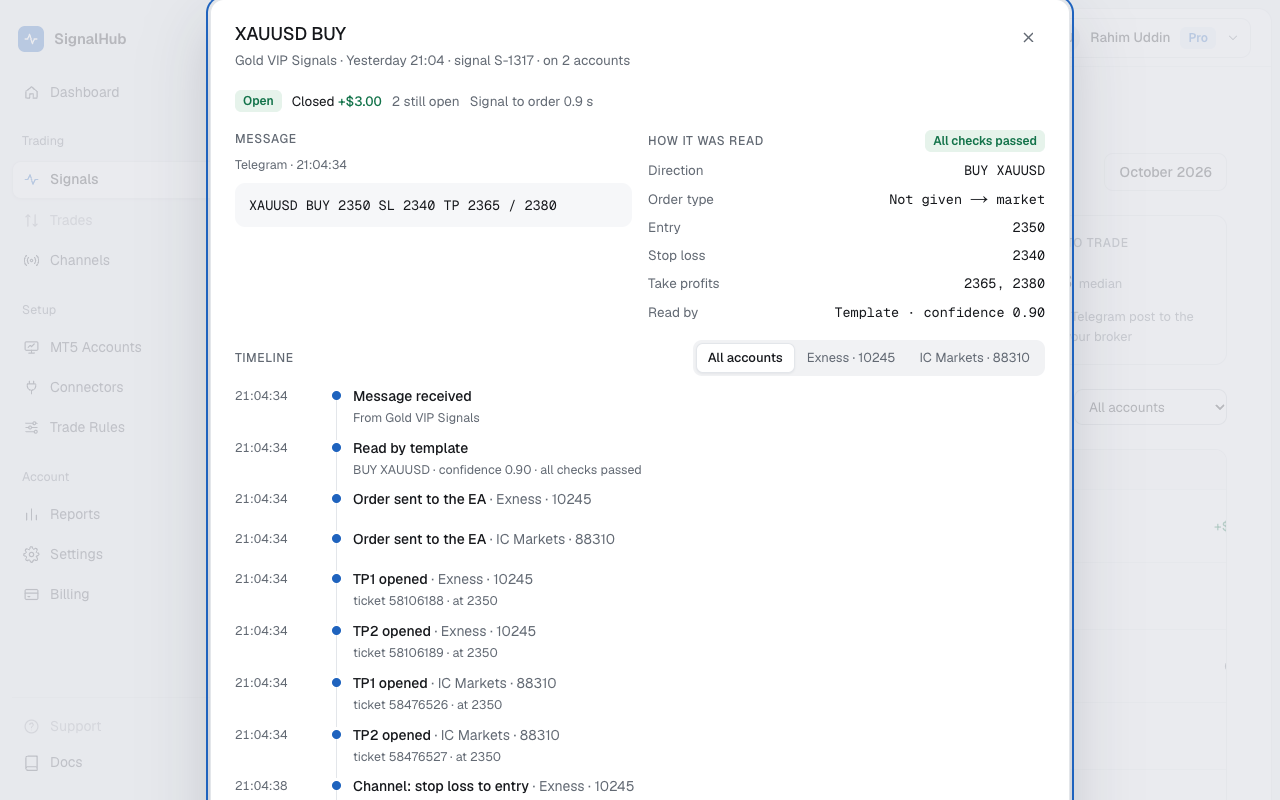
XAUUSD BUY 2350 SL 2340 TP 2365 / 2380. - SignalHubFX reads it, usually in about a second, and checks it: stop loss and take profits on the right side, the message not too old.
- Each of your accounts that the channel is sent to gets an order built from its own Trade Rules.
- Your EA checks the live price, spread and your limits, then opens one position per take profit.
Watch it
Open Signals. The newest signal is on top with what each account did. Click it to see the timeline: every step with its time, from the message to the broker's reply.
Not traded?
The signal shows Not sent or Rejected with a short reason, like "spread too high" or "no account picked". Every reason and what to do about it is in Signal statuses and reasons.
Get alerts
Link your own Telegram bot in Settings → Telegram notifications to hear when a trade opens or closes, a signal isn't traded, or your EA goes offline. See Settings.
What's next
- Check Reports after a week to see how each channel did.
- Set a monthly target.
- Moving to a real account? Accept the risk notice, start with a small risk, and keep the demo running beside it.